Handshake
UX Writing
Project Overview
Key Tasks
Handshake is a fictional app, presented by the UX Writing Collective, that connects Freelancers with Business Owners by providing an all-in-one management tool. As part of the UX Writing Certification, I was tasked to write the in-app text for the two user flows.
I came up with the tagline and headlines that would resonate with both user types, edited all the in-app text for the two user flows, suggested additional screens for a more complete user flow and defined the word usage and brand voice.

I established a mini voice and tone guide, as well as word choice and terminology based on the two user types of the app: the freelancer and the business owner.
For both Business owner and Freelancer flows, I changed the headings and put short, helpful subheads below each. Removed name fields, as it was already covered during sign up, to make it more simple. Changed the CTAs at the bottom of every screen to “Back” and “Next” for easier navigation.
I also included “Want to pay another way?” Option in the Payments screen to offer additional options.
Included a progress tracker so users know how many steps there are.
I changed the generic project set up screens to be more pointed for the user: Business owners create projects while Freelancers search and join existing projects.


For the set up confirmation, changed the copy to a more congratulatory Success messaging with informational text that explains the confirmation messaging, and added a “Got it” CTA.
For the other confirmation pop-ups, I ensured to keep them consistent with the mini-voice guide while keeping the content relevant to its purpose.
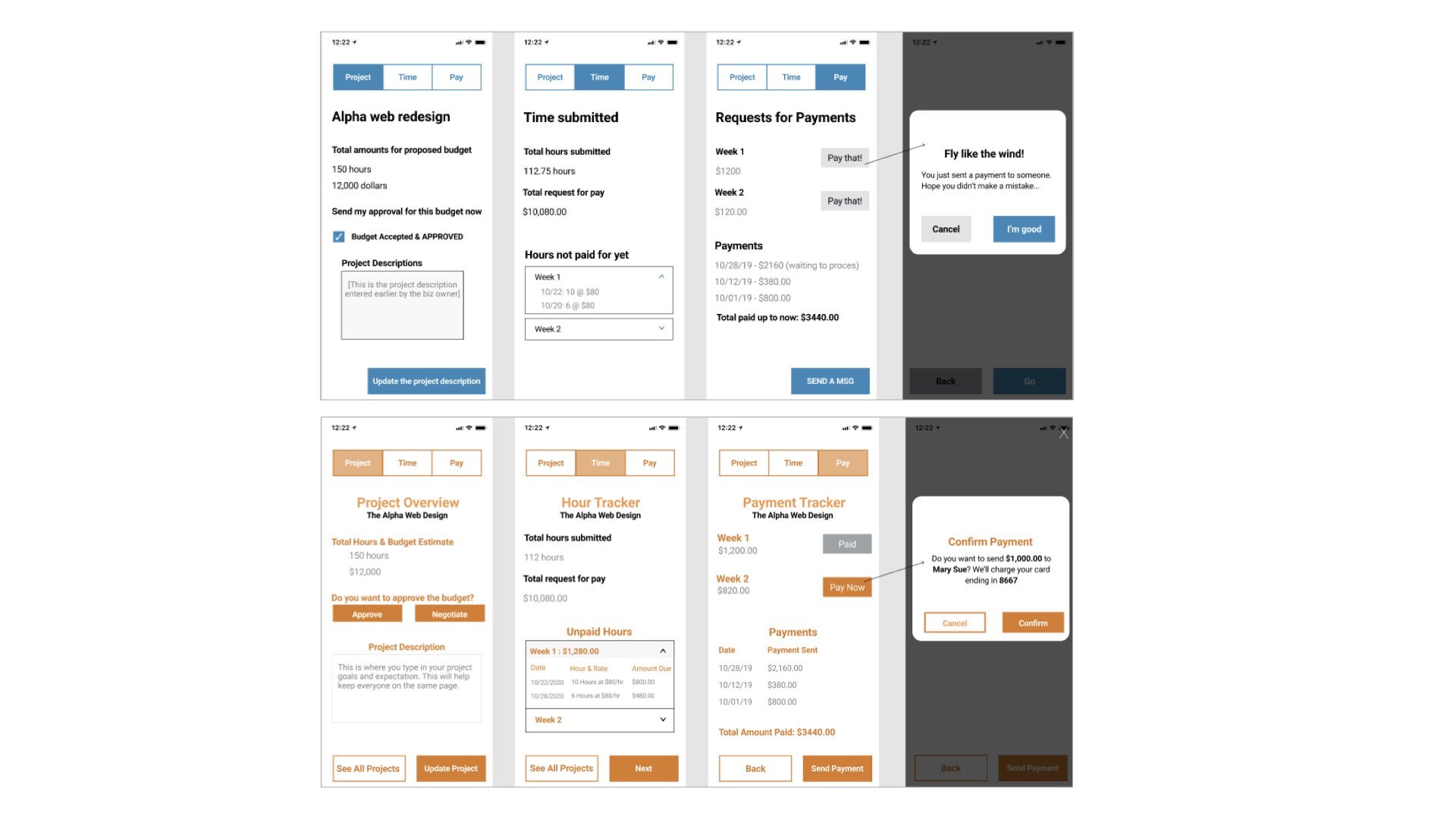
For on going use, similar to the set up flows, I included a Header and sub-header text for both Business Owners and Freelancers for consistency. Changed the dates to MM/DD/YYYY for easier reading. Also changed all names to display full names.
For Business Owners, I added new CTAs depending on the screen, such as “Send Payment” for the Payment Tracker screen. “View All Projects” becomes the secondary CTA so users can easily view projects.
I also suggested the “Negotiate” CTA for deciding budgets.
For the confirmation payment, I aligned it with the previous changes; added the amount being sent, the freelancer’s full name, and the payment method.

For the Freelancer ongoing use screens, there was slight differences in the messaging of the screens.
For project overview, I moved the View Project Description underneath the total hours and budget so less distracting, and visually bolded the Budget and Business Owner’s name for better reference.
On the HourTracker screen, it showed Remaining Hours, whereas the Business Owners sees the hours remaining and budget.

Revised the cancellation request to be simpler with clear and understandable CTAs. Also aligned the content with what was established in the mini-voice and tone guide.